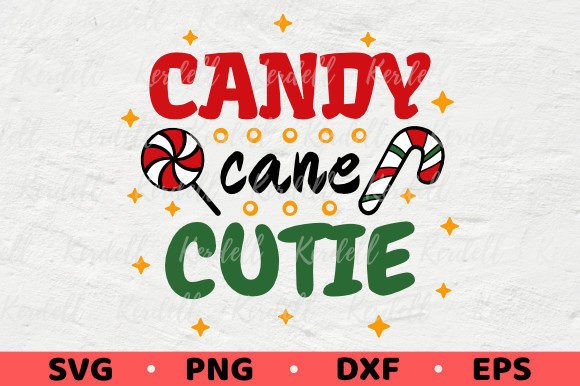
Candy Cane Cutie: A Sweet Graphic for Festive Illustrations
When a client project needs holiday cheer, I look for design assets that feel both polished and playful. The Candy Cane Cutie graphic immediately strikes that balance. It’s not just a generic Christmas clipart; its character-driven charm suggests a specific visual mood. This style leans toward whimsical, friendly, and nostalgic—perfect for projects targeting families, kids, or any brand wanting a warm, handmade feel.
The First Impression: Cozy Nostalgia Meets Modern Craft
Opening the files, the first thing I notice is the illustrative quality. This isn’t a stark, geometric vector. It has a soft, illustrated line work that evokes classic storybook warmth. For a designer working with a boutique, a small business launching holiday merchandise, or an Etsy shop owner creating seasonal product labels, this mood is a direct win. It communicates comfort and joy without being overly cartoonish. The name "Cutie" is accurate—it’s approachable. This asset fits naturally within a visual direction built on charm, not corporate austerity.
Where This Graphic Shines in Real Client Projects
Let’s imagine a practical scenario: a local bakery wants a holiday marketing campaign. They need social media graphics, a poster for their window, and maybe some sticker giveaways. Candy Cane Cutie becomes a versatile hero.
- Packaging & Product Labels: As a central element on cookie bags or hot chocolate mix jars, it instantly establishes a festive, kid-friendly brand touchpoint.
- Social Media Graphics: For Instagram posts or Pinterest pins announcing a seasonal menu, it provides a strong, recognizable visual anchor that feels custom, not templated.
- Merchandise & Print-On-Demand: The description notes it can be printed on anything like t-shirts or mugs. This is key. Placed on a mockup, this illustration transforms a plain mug into a themed product for a small business’s online store.
- Decorative Accents in Layouts: In a blog post about holiday crafts or an email newsletter, used smaller, it acts as a delightful decorative element, breaking up text and reinforcing the seasonal theme.
- Campaign Visuals for Handmade Businesses: For a crafter selling holiday ornaments or a digital seller offering printable party kits, this graphic can serve as a unifying element across different products, creating a cohesive collection look.
The Practical Designer Test: File Formats & Editability
The instant download containing SVG, PNG, DXF, and EPS files in high resolution is a professional’s checklist. For a Cricut user making stickers or a designer needing to tweak colors for brand consistency, the SVG vector file is essential. I can scale it infinitely without quality loss and isolate elements if needed. The high-res PNG ensures crisp results on dark backgrounds or in Canva templates where transparency matters. Before committing to a client concept, I always test these basics.
Critical Checks Before Commercial Use
- Scale Testing: Preview it at both massive size (for a poster) and tiny size (for a small web icon). The intricate lines should hold up.
- Color & Contrast: Place it on both light and dark backgrounds. Does it maintain visual clarity? Converting it to black and white can reveal if it retains its form for potential single-color print runs.
- Font Pairing: How does it interact with type? With a clean sans-serif font, it feels modern. With a playful script, it amplifies the whimsy. It likely clashes with very formal serifs—a note for brand hierarchy.
- Mockup Integration: Drop it onto realistic product mockups—a t-shirt, a mug, a packaging template. Does it look integrated or just pasted? Its illustrative style tends to blend well.
- License Verification: Always confirm the commercial license allows use for client and business projects. The ability to print these images as many times as you need is fundamental for product-based work.
Where to Apply Caution: Context Matters
While versatile, this graphic asset has a specific personality. It wouldn’t be my first choice for a minimalist, corporate holiday report. In crowded layouts with many competing elements, its detailed charm might get lost or feel chaotic. If the client’s brand requires very clean visual hierarchy and stark professionalism, this might skew too "cute." Also, on extremely complex patterned backgrounds, it could struggle to maintain prominence. Its strength is in being a focal point or a clear accent, not a subtle texture.
Impact on Brand Perception & Audience Engagement
Using Candy Cane Cutie in a project isn’t just about decoration. It affects the entire design’s emotional appeal. For audiences seeking authentic, heartfelt holiday content—parents, crafters, community event attendees—this graphic builds visual trust. It feels genuine and engaging. It can elevate a simple social media post or product label from generic to memorable, increasing recognition for a small business’s seasonal offerings. For a designer, it provides a ready-made element of polish, saving hours of illustration time while delivering a custom-looking result.
Final Thoughts for the Working Designer
This graphic design asset is a tool, not a template. Its value lies in how you apply it. For a festive kids’ event invitation, it’s perfect as a large hero graphic. For a series of digital ads for a handmade brand, it can be a recurring brand element. For sublimation designs or Cricut projects, the vector files are ready for production. My review concludes that Candy Cane Cutie is a robust, well-prepared digital product for commercial design. It supports a specific, popular aesthetic. When your client project calls for cozy Christmas cheer with a professional finish, this illustration deserves a close look. It turns a concept into a tangible, festive visual faster, letting you focus on the larger branding and marketing strategy. That’s the real win for any designer, marketer, or content creator under a holiday deadline.